 FlatRateChat
Guide · facts checked October 21, 2026
How to add ChatGPT-style AI chat to a Wix site
“How do I add ChatGPT to my Wix site?” is one of the most repeated questions in the Wix forum. The short answer: there are two realistic routes. You can code it yourself against an AI provider’s API, or you can install a no-code app from the Wix App Market that runs its own AI. This page explains what each route involves, then shows the five-step install of our app. Statements about OpenAI and Wix link to their own help pages, each dated.
First, what “adding ChatGPT” can mean
ChatGPT is OpenAI’s own app. A custom GPT you build there lives inside ChatGPT. OpenAI’s help centre is direct about it: GPTs “are not a way to embed ChatGPT in an external website or application. To build an assistant into a product, use the API” (OpenAI Help: GPTs in ChatGPT, checked October 21, 2026). So when people say they want ChatGPT on their Wix site, they mean one of two things: a chat window on their pages that is powered by an AI model through an API, or a ready-made app that gives visitors AI answers without any of that plumbing.
Option 1: code it yourself with an API key
This is the route for developers and agencies. It gives you full control, and every part of it is your responsibility.
- An API account and key. OpenAI bills API usage separately from a ChatGPT subscription; charges depend on the models and features you use, including token usage (OpenAI Help: billing for ChatGPT and the API, checked October 21, 2026). A ChatGPT subscription does not cover it.
- Backend code that keeps the key secret. The key must never sit in page code where a visitor can read it. On Wix that means Velo backend web modules that call the API and return the answer to the page, plus your own handling of errors and timeouts.
- Paying per use. Every visitor question costs tokens: the question, your instructions, any site text you include, and the answer. A busy week shows up on the bill. You decide the rate limits and abuse protection.
- Keeping it on topic. A general model will happily answer anything, including questions about your competitors or made-up details about your business. To make it answer from your site you have to supply your page text to the model, keep that text current when you change a price, and instruct it to say “I don’t know” rather than fill the gap. Why AI chatbots make things up covers what that takes in practice.
- Wix’s own rules for custom code. If you paste a third-party chat widget instead of building in Velo, Wix requires a published site with a connected domain, and states that it does not provide support for technical issues with third-party code snippets. Wix also notes that in December 2025 it introduced new frontend security measures, so some snippets that used to work may be blocked until the provider updates them (Wix Help Center: Embedding Custom Code, checked October 21, 2026).
If you are comfortable with all five, this route is yours to build. If any of them made you pause, read on.
Option 2: a no-code app from the Wix App Market
An App Market chatbot app runs its own AI, so there is no key to protect, no backend to write and no per-token bill from an AI provider. Wix installs the app on every page and bills any paid plan through your Wix account. What differs between apps is where the answers come from (your site, uploaded documents, or a general model), what the chatbot does when it does not know, and how it is metered. Best AI chatbot apps for Wix compares five of them on exactly those points.
FlatRateChat, listed as AI Website Chatbot, is one of these. To be clear about what it is and is not: it is not ChatGPT, it is not made by OpenAI, and it does not connect to a custom GPT you have built. It runs its own AI and answers only from the text of your published pages, in the language the visitor writes in, with a link to the page each answer came from. When the answer is not on your site it says so and shows your email, phone or contact page. Like any AI, it can be wrong sometimes; the source link lets visitors check. Your content is used only to answer questions on your own site and is not used to train AI models.
Installing FlatRateChat: five steps
The full version, with screenshots and the other ways to add a chatbot to Wix, is in How to add an AI chatbot to a Wix site. In brief:
- Open the App Market from your Wix dashboard (Apps → App Market) and search for “AI Website Chatbot”, or use the button below.
- Click Add to Site. Wix installs the script on every page. There is nothing to paste and no account to create.
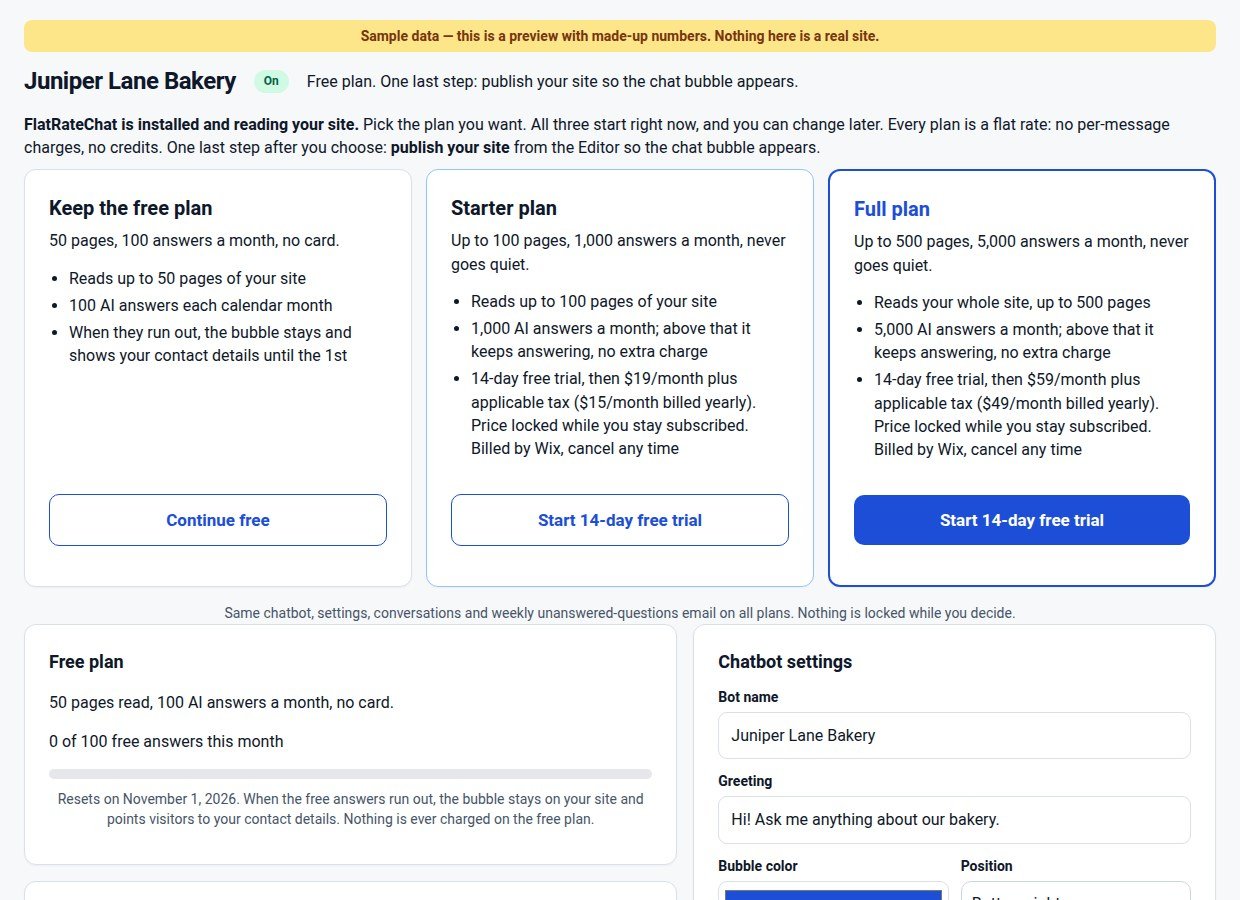
- Choose a plan on the first screen. Keep the free plan (50 pages, 100 answers a month) or start a 14-day free trial of Starter or Full. The chatbot starts reading your published pages right away.
- Set colour, greeting and fallback contact on the FlatRateChat page in your dashboard. It pre-fills the contact details it found on your site; you confirm or edit them.
- Publish and test on the live address. The bubble answers on the published site, not in the editor or preview. Ask something your pages cover, then something they do not.
Not on Wix? Try it on your site
What it costs, compared
With the API route you pay an AI provider per use and your own or your developer’s time to build and maintain it. With FlatRateChat on Wix the plans are flat: Basic is free (50 pages, 100 answers a month; at the limit the bubble stays up and shows your contact details until the 1st), Starter is $19 a month or $15 a month billed yearly, and Full is $59 a month or $49 a month billed yearly. Above the included answers, the paid plans keep answering at up to 10 answers an hour, with no overage charges. The FlatRateChat for Wix page has the plan table, and what happens when your chatbot runs out of credits compares run-out behaviour across vendors.
Which route should you take?
Build it yourself if you need the chat to do things only custom code can do: look up an order, call your own database, follow a scripted flow. Install an app if what you want is for visitors to get answers from your site, with your contact details for everything else, and you would rather not manage keys, bills and prompts. Either way, test it on the published site with a question that is not on your pages before you tell anyone it is live.
Questions
Can I put my custom GPT on my Wix site?
Not directly. OpenAI’s help centre says GPTs “are not a way to embed ChatGPT in an external website or application” and that building an assistant into a product means using the API. You can link to your GPT from your site, but visitors need ChatGPT to use it.
Is FlatRateChat ChatGPT?
No. FlatRateChat is an independent app and is not made by OpenAI. It runs its own AI and answers only from the text of your published pages, with a link to the page each answer came from. It does not connect to your custom GPT.
Do I need an API key or a ChatGPT subscription for FlatRateChat?
No. There is no API key, no separate account and no code to paste. You install it from the Wix App Market and any paid plan is billed through your Wix account.
Does Wix let me paste a chatbot script myself?
Yes, through Settings → Custom Code, as long as your site is published and has a connected domain. Wix’s Help Center says Wix does not provide support for technical issues with third-party code snippets, so the chatbot vendor is your support contact.
Sources: the OpenAI and Wix help pages linked above, checked October 21, 2026. ChatGPT and GPT are OpenAI’s products; FlatRateChat is not affiliated with OpenAI or Wix.