 FlatRateChat
Explainer · checked October 21, 2026
Why AI chatbots make things up (and how to limit it)
A chatbot on your website that invents a price, a policy or a link is worse than no chatbot. This page explains in plain terms why a general AI model does that, what actually limits it, and how to test any chatbot before it talks to your customers. One thing up front: no AI is perfect, ours included. The goal is to make mistakes rare, visible and easy to correct.
Why it happens
A large language model does one thing: given some text, it produces the most plausible continuation. Ask it about your opening hours and it will produce something that looks like opening hours. If your real hours are in the text it was given, the plausible answer and the correct answer are usually the same. If they are not, the model has nothing to check against, and a plausible guess comes out in exactly the same confident tone. It does not know that it does not know. The common name for this is “hallucination”; a plainer one is making things up.
Three things make it worse on a business website. First, a general chatbot that answers from the open internet has read thousands of other businesses’ pages, so it can confidently describe a return policy that is someone else’s. Second, prices and hours change, and a model trained months ago has no way to notice. Third, links: a model can produce a URL that looks exactly like one of yours and does not exist.
A documented example
In 2024 CBC News reported on a case in which an airline’s website chatbot gave a passenger incorrect information about a bereavement fare; the passenger booked on that basis and was then refused the discount. The British Columbia Civil Resolution Tribunal found the airline responsible for what its chatbot said and ordered it to pay $812. The tribunal member wrote: “It makes no difference whether the information comes from a static page or a chatbot” (CBC News, February 2024). The point for a small business is simple: a chatbot’s answer is your website’s answer.
What limits it
You cannot switch hallucination off, but you can change what the model is allowed to work with and what happens at the edges. These are the controls that matter, in order of effect.
- Answer only from your own pages. If the chatbot is given the text of your published pages and told to answer from that text and nothing else, it has far less room to invent. A question about something your pages do not mention becomes a known gap, not a guess. This is the single biggest lever.
- Show the source. An answer that links the page it came from can be checked by the visitor in one tap. If the link goes to your Hours page and the answer says Tuesday to Saturday, the visitor can see the same words there. Mistakes do not disappear, but they become visible instead of hidden behind a confident sentence.
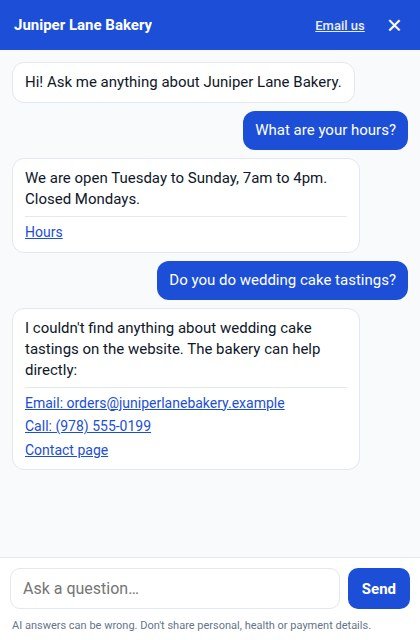
- Say “I don’t know” and hand over. When the answer is not in your pages, the right reply is a plain “I don’t have that on this website” followed by your email, phone number or contact page. The visitor still gets somewhere; you get a message you can answer; nothing is invented.
- Read the unanswered questions. Every “I don’t know” is a fact your website is missing. A list of those questions, read once a week, tells you which page to add or update. After a few weeks, the chatbot answers more because your site says more.
- Keep the text current. A chatbot that re-reads your site regularly, and on demand when you change a price, is working from today’s pages rather than last quarter’s.
- Test it like a difficult customer. Before launch, ask a question your site answers, a question it does not, a question about a competitor, and a question with a wrong assumption in it (“Is the Sunday brunch still $15?” when there is no Sunday brunch). Do this on the published site, not the editor.
How FlatRateChat applies this
FlatRateChat is built around the first three controls and gives you the tools for the other three. It reads the pages of your published website and answers visitors from that text only, in the language the visitor writes in. Every answer links to the page it came from. When the answer is not on your site it says so and shows your email, phone or contact page instead of guessing. You get a weekly email of the questions it could not answer, a weekly re-read of your site plus a re-read button for the day you change your prices, and your last 100 conversations kept for 90 days in your dashboard. Your website text is used only to answer questions on your own site and is not used to train AI models.
It can still be wrong sometimes, like any AI. A page with two different prices on it, an out-of-date PDF, or a question that straddles two pages can produce an answer you would have phrased differently. What the source link and the contact fallback do is make those cases checkable and recoverable rather than invisible.
On Wix it installs from the App Market as AI Website Chatbot, with a free plan (50 pages, 100 answers a month) and flat paid plans; details on the FlatRateChat for Wix page. On any other website it is $59 a month flat; free trials open later this month.
Not on Wix? Try it on your site
Questions to ask any chatbot vendor
Whichever product you are considering, including ours, these five questions separate the controls above from the marketing.
- Does it answer only from my pages, or from a general model as well? If both, which wins when they disagree?
- Does every answer show the page it came from?
- What exactly does a visitor see when the answer is not on my site? Ask for a screenshot.
- How do I see the questions it could not answer?
- How often does it re-read my site, and can I trigger a re-read?
If you are building your own chat against an AI provider’s API instead, the same controls apply, but you implement them yourself: supplying your page text, instructing the model to refuse when the text does not contain the answer, and keeping the text current. How to add ChatGPT-style AI chat to a Wix site sets out what that involves next to the no-code route.
Questions
Why does an AI chatbot invent answers?
A language model produces the most plausible next words for the text it was given. When the fact it needs is not in that text, it has nothing to check against, so a plausible-sounding guess comes out in the same confident tone as a correct answer. The usual name for this is hallucination.
Can any chatbot promise it will never make things up?
No. Any system that generates text can be wrong sometimes, including FlatRateChat. What you can ask for is a chatbot that answers only from your own pages, shows the page it used, and says it does not know instead of guessing, so mistakes are rarer and visible.
What should a chatbot do when my site does not have the answer?
Say so in plain words and hand the visitor to you: your email, phone number or contact page. That turns a gap in your site into a message you can answer, rather than an invented reply.
How do I find out what my chatbot is getting wrong?
Read the questions it could not answer and a sample of real conversations. FlatRateChat emails you the unanswered questions weekly and keeps your last 100 conversations for 90 days in your dashboard. Then add the missing facts to your pages.
The news example links to the CBC News article of February 2024, opened and checked October 21, 2026. Nothing on this page should be read as a promise that any AI chatbot, including ours, is always right. Related reading: what happens when your chatbot runs out of credits and Wix Chat is being retired: what to switch to.