 FlatRateChat
Guide · facts checked October 21, 2026
Wix Chat is being retired: what to switch to
If you have Wix Chat on your site, you may have seen the notice: Wix says it will soon stop supporting it and recommends Wix Smart Chat instead. This page sets out what Wix has actually said, what changes if you switch, what Smart Chat does not include yet, and the realistic options, including an AI-only app such as ours. Every statement about Wix comes from the Wix Help Center, linked and dated.
What Wix has said
Wix’s Help Center article on the change opens with “Soon, Wix Chat will no longer be supported.” It gives no date (Wix Help Center: Moving from Wix Chat to Wix Smart Chat, checked October 21, 2026). The same article says Wix Chat will no longer be available to install from the Wix App Market and will stop receiving updates and ongoing support. If you already use Wix Chat you can continue using it; new improvements go only to Smart Chat, and Wix recommends switching. So the switch is recommended, not required, and there is no published shutdown date.
Wix describes Wix Chat as real-time messaging handled entirely by you and your team, and Smart Chat as live conversations plus an AI chat that answers from your site content and the training you provide (same article).
What changes if you switch to Smart Chat
Three things from the Wix article are worth knowing before you click Switch.
- You set up the chat again. Wix says you need to set up your chat again in Smart Chat, including your settings and design, and suggests reviewing your current setup first so you can recreate it. Your existing conversations and history remain accessible in your Wix Inbox.
- Three Wix Chat features are not in Smart Chat yet. Wix lists them as “not currently supported”: Members Chat (site members chatting with each other), rule-based automatic replies through Wix Automations, and translation support for localising the chat interface into your site’s languages.
- The AI part runs on AI credits. Wix says the AI chat uses a quota of AI conversations, with a free amount and higher quotas on upgraded plans; manual (live) chat in Smart Chat is free to use and does not need an upgrade. A separate Wix article explains that Smart Chat now draws on the AI credits included in your Wix plan, shared with other Wix AI tools, and that when the credits are used up the Smart Chat switches to offline mode, with the option of changing the availability mode to “Manual Chat 24/7” and answering yourself (Wix Help Center: Smart Chat and AI credits, checked October 21, 2026).
On the credits themselves: Wix’s About AI Credits article (checked October 21, 2026) says credits apply to your whole Wix account, are used by Smart Chat and other Wix AI tools from the same balance, and do not roll over. On a free Wix plan you can use up to 30 credits a day, to a maximum of 120 a month. What that means for a busy chat is covered in what happens when your chatbot runs out of credits.
What to check before you choose
Wix Chat was a manual tool: a person answered. The replacement question is really two: do you still want to answer visitors yourself, and do you want an AI to answer when you cannot?
- Which Wix Chat features do you actually use? If Members Chat, Automations replies or interface translation matter to your site, Smart Chat does not offer them today, by Wix’s own list.
- Who answers, and when? If you want to keep typing replies from your Wix Inbox, you need manual chat. If you want questions answered while you are closed, you need an AI that answers from your site.
- What the AI is allowed to say. Does it answer only from your pages? Does it link the page it used? What does it do when the answer is not on your site? Why AI chatbots make things up explains why these three details matter more than the model name.
- What it costs when it is busy. Credits, conversations or a flat number; and what happens on the day the allowance runs out.
- How much you have to rebuild. Settings, design, greeting and the pages the AI should ignore.
Your options
Option 1: Wix Smart Chat
Free to install, manual chat free to use, AI chat on your plan’s AI credits, managed from your Wix dashboard. It keeps your chat history in the Wix Inbox and lets you mix AI and manual answering by time slot (Wix article above). It is the natural choice if you want to keep answering some conversations yourself.
Option 2: another live-chat app from the App Market
Several App Market chat apps combine live chat with messaging channels such as WhatsApp or Messenger, some with an AI add-on. Our Wix Smart Chat alternatives page lists them with ratings, prices and how each one meters its AI, all from the listings on the date shown.
Option 3: an AI-only app such as FlatRateChat
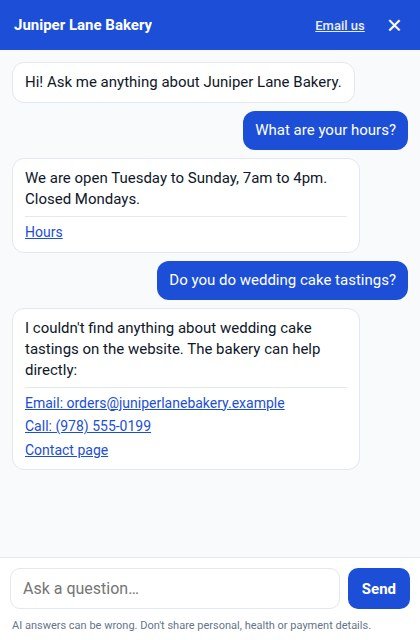
FlatRateChat is listed in the App Market as AI Website Chatbot. It reads the pages of your published Wix site and answers visitors from that text only, with a link to the page each answer came from. When the answer is not on your site it says so and shows your email, phone or contact page instead of guessing. Like any AI, it can be wrong sometimes, which is why every answer carries its source. Your website text is used only to answer questions on your own site and is not used to train AI models.
What it does not do: FlatRateChat has no live or manual chat with a human, no WhatsApp or Messenger, no Members Chat, no lead forms. If you used Wix Chat to talk to customers yourself, FlatRateChat does not replace that part; it replaces the “answer the same questions all day” part, and it can point visitors to your contact page or form for everything else.
It runs on its own AI, separate from your Wix plan’s AI credits. The free Basic plan reads up to 50 pages and includes 100 answers a month; when those are used up the bubble stays on your site and shows your contact details until the 1st. Starter is $19 a month ($15 a month billed yearly) and Full is $59 a month ($49 a month billed yearly); above the included answers the paid plans keep answering at up to 10 answers an hour, with no overage charges. Paid plans start with a 14-day free trial billed through your Wix account. Plans and details are on the FlatRateChat for Wix page.
A simple way to decide
If you want to keep talking to visitors yourself, switch to Smart Chat and note the three missing features. If what you want is for the repeat questions (hours, prices, services, policies) to be answered from your site while you work, with your contact details for everything else, an AI-only app does that at a flat price. If you want both, pick one bubble: Wix itself notes that two chat widgets on one page can confuse visitors.
Questions
Do I have to remove Wix Chat from my site?
Not according to Wix. Its Help Center says that if you already use Wix Chat you can continue using it, but it will stop receiving updates and support, and Wix recommends switching to Wix Smart Chat.
When does Wix Chat stop working?
Wix has not published a date. Its article says only that “Soon, Wix Chat will no longer be supported” and that it will no longer be available to install from the App Market.
Is Wix Smart Chat free?
Wix says both apps are free to install and that manual (live) chat in Smart Chat is free to use. The AI chat in Smart Chat uses the AI credits that come with your Wix plan, shared with other Wix AI tools.
Does FlatRateChat replace live chat?
No. FlatRateChat answers visitors’ questions from your published pages and shows your contact details when the answer is not there. It has no live or manual chat with a human. If you need to talk to visitors yourself, choose Smart Chat or a live-chat app.
Sources: the three Wix Help Center articles linked above, all checked October 21, 2026. Wix’s plans and wording change; read the current articles before you decide. FlatRateChat is an independent app and is not affiliated with or endorsed by Wix.